Introduction
Most "AI apps" are a chat box wrapped around a prompt. The interesting frontier is different: apps that hand the model real tools and real interface, so the answer isn't a paragraph of guesses — it's a live widget backed by your data, rendered right inside the conversation.
That's what we built with the Xflow ChatGPT app, and it's powered by something most people haven't touched yet: MCP UI. Here's the build, the submission gauntlet (kept short), and what MCP UI actually unlocks.
The Xflow ChatGPT app
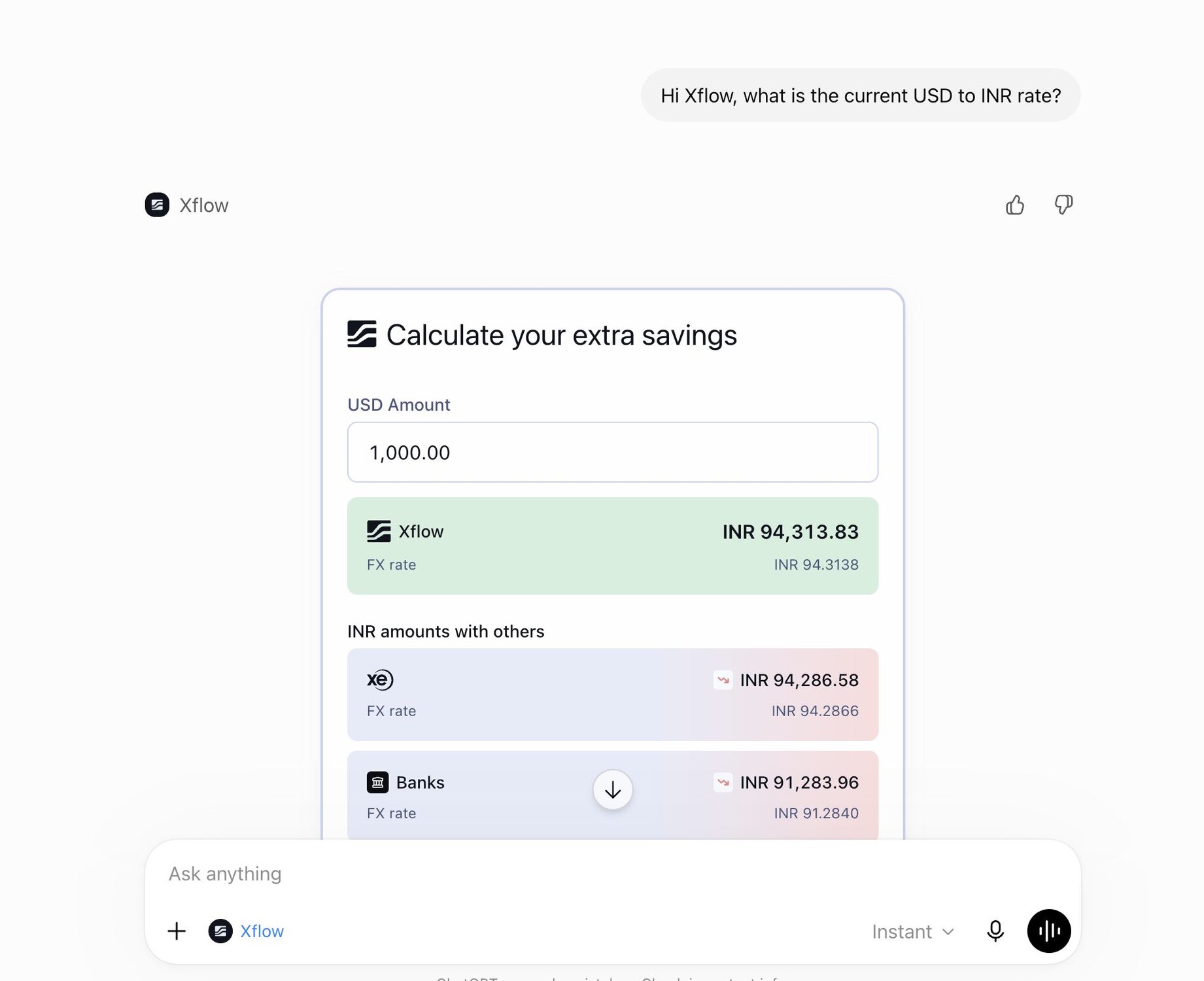
Xflow moves money across borders. A constant question for our exporters and finance teams is brutally simple and surprisingly hard:
"Is now a good time to convert USD to INR?"
Answering it well means watching live rates, recent trends, and forward sentiment — usually across three different tabs.
So we moved the answer to where the question gets asked. Inside ChatGPT, you can now type, "What's the USD/INR rate right now, and where's it heading?" and get a data-backed, interactive response — not a stale figure the model half-remembers from training.
How to use the Xflow ChatGPT app
Here's a simple step-by-step guide on why you can start using Xflow app inside ChatGPT:
- Open Apps in ChatGPT.
- Search for Xflow.
- Click Add to connect the app.
- Start a new chat, tag @Xflow, and ask questions like:
- "What's the USD/INR rate today?"
- "How much is $25,000 in INR?"
- "Should I convert my USD earnings now or wait a few days?"
The app will fetch live rates, forecasts, and market insights directly from Xflow inside ChatGPT.
What it can actually do (with live output)
The app exposes a focused set of FX tools. I ran them live while writing this:
Live rate + conversion: Ask for a conversion and it returns Xflow's real mid-market rate, with XE as a reference.
3-day AI forecast: It returns Xflow's daily AI-generated USD/INR outlook — an expected range plus a target high.
This comes from Xflow's sentiment engine, which processes 5M+ data points and 1,000+ headlines daily, weighing Brent crude, FPI flows, RBI liquidity, and macro data.
Intraday history: It pulls today's rate series in 10-minute buckets so you can see the shape of the session, not just a single point.
The difference from a normal chatbot: these aren't the model's opinion. Every number is fetched from Xflow's live pricing and forecast systems at the moment you ask.
How does it actually work?
Your app is two things at once: a set of tools the model can call, and a small interface the user can see. The model decides what to do and calls your tool; your backend does the real work; the result comes back as a live UI rendered right in the conversation (it runs in a sandboxed iframe and talks to ChatGPT over a standard bridge). The model orchestrates, your app owns the surface and the truth. And because MCP is an open standard, the same app can light up in other assistants too — not just ChatGPT.
It's not one fixed widget, either. The Apps SDK gives you a few shapes to choose from: an inline card for a quick answer or confirmation, a carousel when you're browsing a few similar things, a fullscreen view for richer exploration, and even a picture-in-picture window for something that stays alive alongside the chat. You pick the smallest shape that does the job.
The thing to actually learn: MCP UI
Here's the concept worth taking away even if you never touch FX.
MCP (Model Context Protocol) is the open standard that lets a model call external tools in a structured way. The newer, less-understood piece is MCP UI: a tool can return not just data but a rendered, interactive component that appears inline in the chat.
So instead of the model saying "the rate is around 94.6", the Xflow app returns a live calculator widget and a rate chart — real UI, embedded in the conversation, that the user can interact with. The model orchestrates; your app owns the surface and the truth.
Why this matters:
- Trust. The number comes from your system, timestamped — not a hallucination.
- Interaction. Users can change the amount, scrub the chart, re-run the forecast — without leaving chat.
- Ownership. You control the experience and the data, even though it lives inside someone else's assistant.
Takeaway
The biggest takeaway from building the Xflow ChatGPT app is that AI becomes far more useful when it's connected to real systems and real data. MCP UI makes that possible by letting applications bring interactive experiences directly into the conversation.
For us, that meant turning FX insights into something users can access instantly inside ChatGPT. We think this is just the beginning of how software will be built and experienced.
If you want that same AI-backed rate forecasting outside of ChatGPT, Xflow's FX AI Analyst puts the same target-rate calls straight into your dashboard.
Curious how we got here? Read the xflow journey simplifying international payments.